OAuth Client Credentials
Create provider-owned OAuth apps for MCP servers that need a manual Client ID and Client Secret.
When You Need This
Use this guide when an MCP server does not support Dynamic Client Registration and the QuilrAI setup flow asks for OAuth credentials.
For DCR-compatible MCP servers, you do not need to create a provider app. Use OAuth Connect and authorize directly.
Before You Start
Have these values ready:
Create a separate OAuth app for each QuilrAI tenant or environment if the callback URL is different. This keeps rotation, testing, and production authorization separate.
Slack
Use a Slack app when a Slack MCP integration asks for a Slack Client ID and Client Secret.
-
Open the Slack app dashboard and click Create New App.
-
Choose From scratch, enter an app name, and select the workspace that should own the app.
-
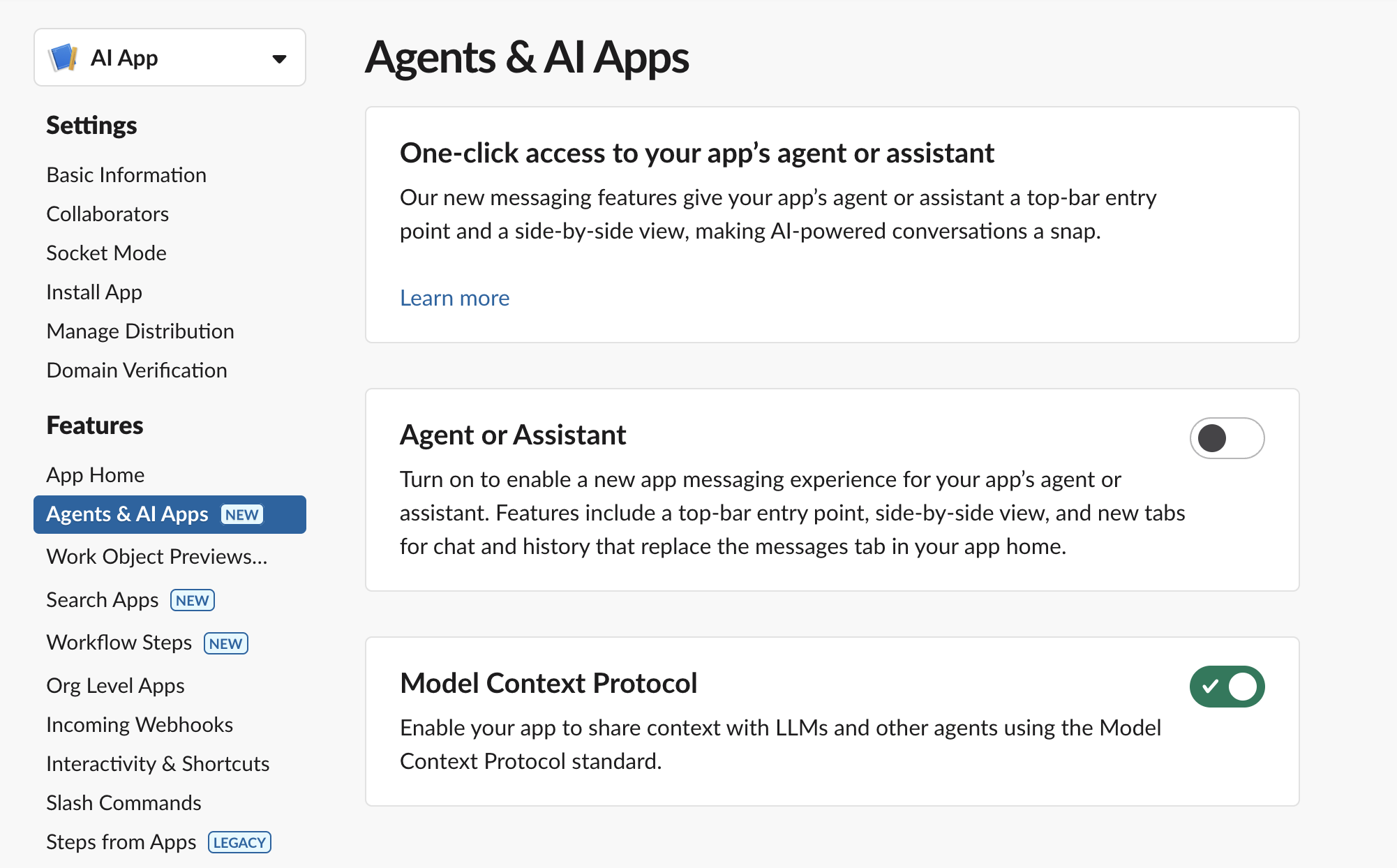
Open Agents & AI Apps and turn on the Model Context Protocol feature.
-
Open OAuth & Permissions.
-
Under Redirect URLs, click Add New Redirect URL, paste the QuilrAI callback URL, and save.
-
Under User Token Scopes, add the scopes required by the Slack MCP tools you plan to enable.
-
If you also run an in-Slack bot experience, add those bot scopes separately under Bot Token Scopes. Slack MCP tool permissions are granted on the user token.
-
Open Basic Information.
-
Under App Credentials, copy the Client ID and Client Secret.
-
Paste those values into the QuilrAI manual OAuth setup screen, then click Connect and authorize Slack.
Slack MCP user-token scopes:
Keep these Slack details in mind:
- Use Client Secret, not Signing Secret. The signing secret is for verifying Slack events and is not used as the OAuth client secret.
- Slack requires MCP clients to be backed by a registered Slack app. Only internal apps or Slack Marketplace-published apps can use MCP; unlisted apps cannot use MCP.
- Slack's MCP server uses user tokens for tool access. Add only the scopes needed by the tools you enable in QuilrAI.
- For a single internal workspace, the app can stay private to that workspace.
- If the same Slack app must be installed across multiple workspaces, configure Slack app distribution before sharing the install flow.
- Slack redirect URLs must match the URL used by the OAuth flow. If QuilrAI shows a new callback URL later, add it to Slack before reconnecting.
GitHub
Use a GitHub OAuth app when a GitHub MCP integration asks for a GitHub Client ID and Client Secret.
- Decide whether the OAuth app should be owned by a user account or an organization.
- In GitHub, open Settings.
- Open Developer settings.
- Open OAuth Apps and click New OAuth App.
- Enter an Application name.
- Enter a Homepage URL. This field is informational only and is not part of the OAuth flow, so use any public URL such as your company website.
- In Authorization callback URL, paste the QuilrAI callback URL. This is the gateway redirect URL and must match exactly.
- Leave Enable Device Flow unchecked. The QuilrAI gateway uses the standard authorization-code flow with the callback URL above.
- Click Register application.
- Copy the Client ID.
- Click Generate a new client secret and copy the secret immediately.
- Paste the Client ID and Client Secret into the QuilrAI manual OAuth setup screen, then click Connect and authorize GitHub.
Keep these GitHub details in mind:
- GitHub OAuth apps support one callback URL. Create a separate OAuth app for each QuilrAI environment that has a different callback URL.
- GitHub OAuth scopes are requested during authorization, not configured on the app record.
- Use only public information in the OAuth app fields. GitHub advises against entering sensitive or internal URLs, so use a public homepage URL.
- If your GitHub organization restricts OAuth apps, an organization owner may need to approve the app before users can authorize it.
- GitHub recommends GitHub Apps for many new integrations, but use an OAuth app when the MCP integration specifically asks for OAuth Client ID and Client Secret.
Store And Rotate Secrets
- Store Client Secrets only in QuilrAI and your approved secret-management system.
- Do not send Client Secrets through email, chat, client-side code, public repositories, or tickets.
- Rotate the provider secret if it is exposed or if ownership changes.
- After rotating a secret, update the MCP's manual OAuth credentials in QuilrAI and reconnect if the provider invalidates existing tokens.
- Remove unused OAuth apps from Slack or GitHub so stale credentials cannot be reused.