AI Assets
Review AI-related assets discovered through in-scope endpoint/browser telemetry and SaaS sources, then connect usage with users, detections, outcomes, and governance.
Navigation: AI Inventory > AI Assets. Use Inventory for component-sourced activity and SaaS for SaaS-discovered assets.
Configuration and options: The Endpoint Agent view exposes Endpoint Agent and Discovery subviews plus requests, sensitive volume/percentage, detections, blocked count/percentage, and users. SaaS exposes summary metrics, adoption trends, views, filters, and an asset table when data exists.
Role-specific value: Administrators govern ownership, permitted use, and source onboarding; Engineers prioritize high-volume/high-sensitive/high-detection assets and inspect supporting interactions and guardrails.
Verification: An asset selected from the overview can be connected to users, accounts, detections, outcomes, and relevant controls.

Endpoint Agent asset row showing requests, sensitive activity, detections, blocked outcomes, and users.
Endpoint asset walkthrough
-
Choose Inventory > Endpoint Agent and select Endpoint Agent or Discovery as appropriate.
-
Compare Requests with Sensitive count/percentage, Detections, Blocked count/percentage, and Users. High volume and high sensitive share deserve review even when the block rate is low.
-
Open a representative asset. Depending on its source, the drawer may include Overview, Tool Usage, Model Usage, Interactions, Guardrails, Vulnerable Dependencies, Monitored Browsers, and Group & User Rules.
-
Use Interactions to understand activity, Guardrails/Group & User Rules to compare configured behavior, and Vulnerable Dependencies only as evidence requiring technical validation.
-
Pivot to Users and Accounts and Findings before changing a control. Use the AI Asset record as the current inventory reference.
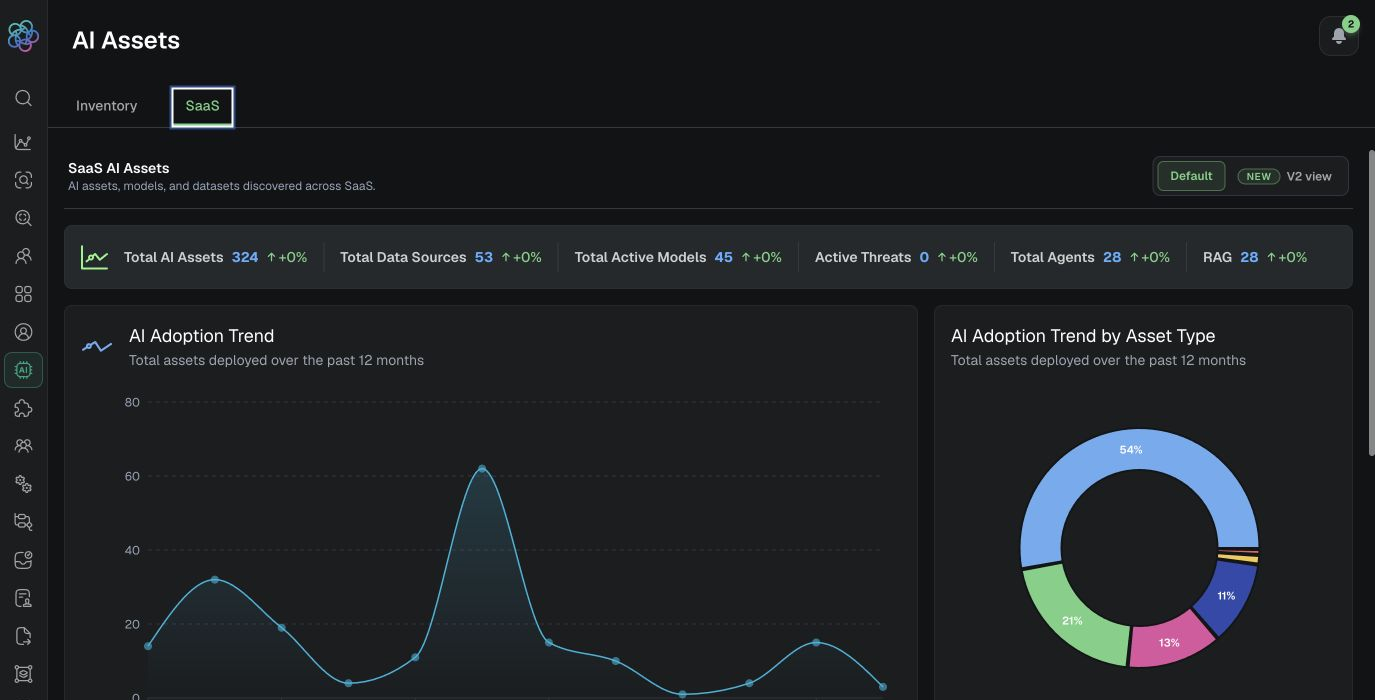
Populated SaaS AI Assets overview with asset totals and adoption trends.
SaaS asset walkthrough
-
Open SaaS and choose the available Default or V2 view.
-
Review Total AI Assets, Data Sources, Active Models, Active Threats, Agents, and RAG metrics, then inspect adoption trends.
-
When rows exist, review Asset ID, Name, Type, Deployment, Source, Version, Guardrails, Tags, Provisioning Status, and Integration Points.
-
If the screen says Not enough data, verify source onboarding and the time/data population before concluding that no assets exist.
Expected result: The team can prioritize an asset using both usage and security context instead of raw discovery alone.
Verification: Reconcile the asset’s users, accounts, interactions/detections, related findings, and configured guardrails. In the populated SaaS view, confirm the summary total agrees with the result count before filtering or drilling into a row.
Inventory fields and asset types
Expand a representative App-type AI asset
-
Filter Type to Apps and choose a populated asset. If no row exists, document the data gap and do not infer detail tabs.
-
Record Asset ID, source, deployment, version, provisioning state, tags, and integration points before opening the row.
-
Review the available Overview, Tool Usage, Model Usage, Interactions, Guardrails, Vulnerable Dependencies, Monitored Browsers, and Group & User Rules areas only when they appear for that asset/source.
-
Correlate users and interactions with Findings and Accounts. Validate dependency findings technically before escalation and compare guardrails with the policy outcome.
Applications end-of-life notice
Applications is end-of-life and has been replaced by AI Assets. Use AI Assets for current inventory, discovery, and investigation workflows. Historical references to an Applications screen are migration context only and should not be used for new operating procedures.