Datadog
Datadog exposes its MCP server through an OAuth flow tied to your Datadog organization. Unlike Slack and GitHub, you do not create a separate OAuth app or supply a Client ID and Client Secret. Instead, you register the QuilrAI callback URL in Datadog's organization settings and then add your site-specific Datadog MCP server URL to QuilrAI.
How Datadog Differs
- No custom OAuth credentials. Datadog handles authorization using your existing org login, so there is no Client ID or Client Secret to create.
- Site-specific MCP URL. Each Datadog site (US1, US3, US5, EU1, AP1, AP2, UK1) has its own MCP endpoint. You copy your endpoint from the Datadog MCP Server setup page after selecting your site.
- Two endpoint variants per site. The same site exposes a core toolset endpoint and an all-toolsets endpoint, and they return very different numbers of tools. See Choose Your Toolset Endpoint below. This trips people up more than the OAuth setup does.
- Redirect URL allowlist. Datadog requires you to explicitly trust the QuilrAI callback URL before the OAuth flow will succeed.
- Write tools need a second, separate opt-in. Holding the
mcp_writepermission on your Datadog role is not enough by itself. Write tools also have to be turned on at the organization level, or they will not show up even for an authorized write-capable user. See Required Datadog Permissions.
Connect Datadog
1. Configure Datadog Organization Settings
Both the redirect URL allowlist and the org-level MCP toggles live on the same Datadog Preferences page.
- Log in to Datadog and go to your profile.
- Look under Organization Settings.
- Scroll down to General and select Preferences (URL:
https://<your-site>.datadoghq.com/organization-settings/preferences). - Confirm MCP Access is Enabled. When it is disabled, no one in the organization can use any MCP functionality.
- If your agents need write tools, also enable MCP Write Access. This is disabled by default.
- Scroll to the MCP OAuth Redirect URLs section.
- In the URL input, enter
https://mcpgateway.quilrai.com/oauth/callbackorhttps://mcpgateway.quilr.ai/oauth/callbackand click Add URL.
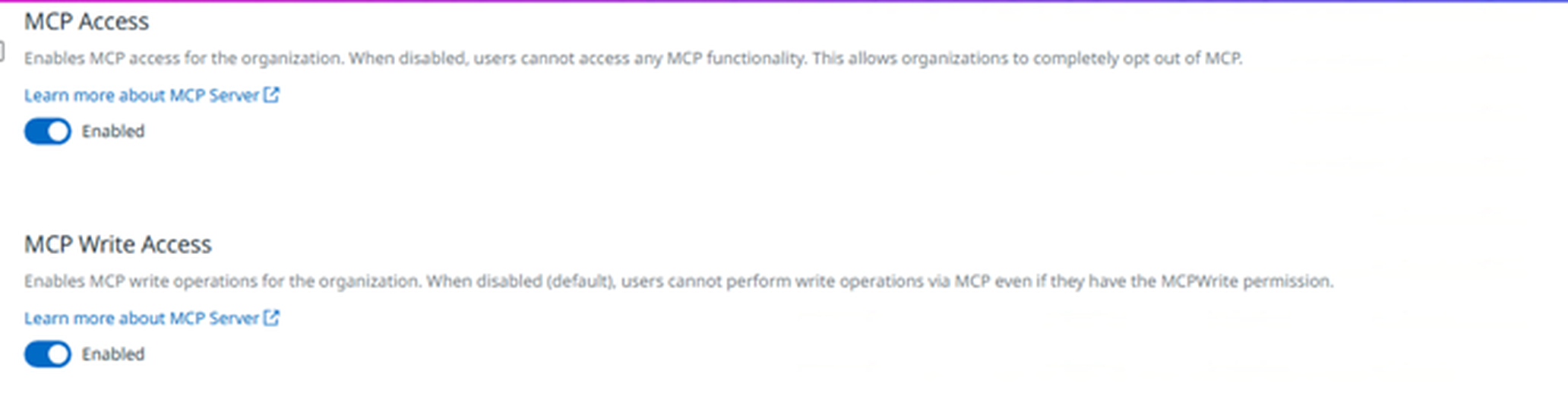
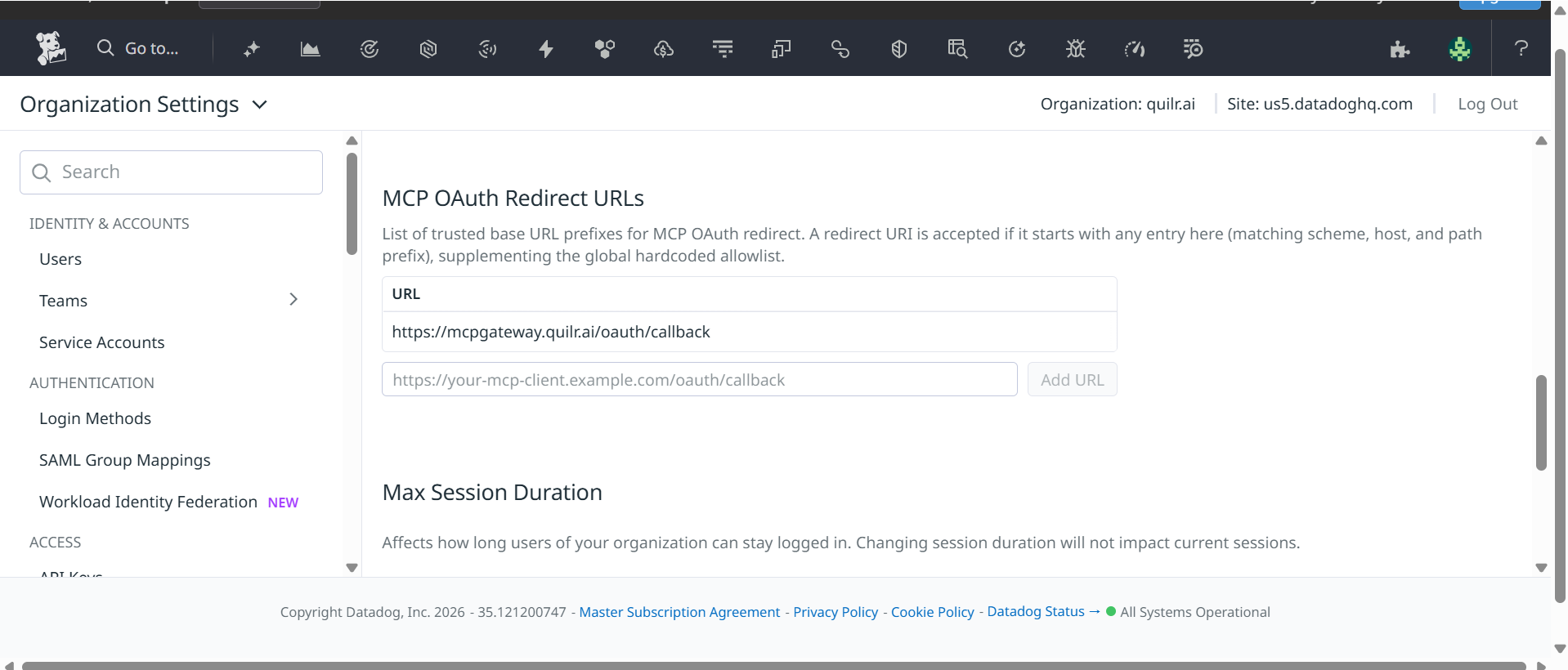
The QuilrAI callback URL must appear in the allowlist before you authorize the MCP connection. If it is missing, the OAuth redirect will be rejected by Datadog.
2. Get Your MCP Server Endpoint URL
- Open the Datadog MCP Server setup page. The page defaults to instructions for a specific client. Click the ChatGPT tab instead, since it shows the raw endpoint URL most clearly.
- In the Datadog Site selector (top-right of the page), select your organization's site, for example
us5.datadoghq.com. - The page updates to show your site-specific MCP endpoint URL. Copy it.
Endpoints follow the pattern https://mcp.<site>/v1/mcp:
Always confirm the exact value on the setup page for your site rather than hand-constructing it, since query parameters change which toolset it serves (see Choose Your Toolset Endpoint).
The MCP server URL and every OAuth endpoint must match your organization's actual Datadog site. Mixing sites is the most common cause of a failed connection. Datadog government sites (ddog-gov.com) are not supported.
3. Add Datadog MCP to QuilrAI
- In QuilrAI, go to MCP Gateway and click Add MCP.
- Paste the Datadog MCP endpoint URL you copied above (core or
?toolsets=all, per Choose Your Toolset Endpoint). - Authorize when prompted. Datadog's OAuth flow opens and asks you to approve access.
- After authorization, QuilrAI connects and fetches available tools.
Required Datadog Permissions
The Datadog user authorizing the connection needs:
mcp_read- allows read-only tool use (metrics, logs, dashboards, monitors).mcp_write- required for tools that create or update Datadog resources.
Users also need the standard Datadog permissions for the underlying resources. For example, a monitor tool still requires Monitors Read.
Grant only the roles your agents actually need.
Having mcp_write on your role is necessary but not sufficient on its own. Write tools also have to be turned on separately in Datadog's organization settings, under Preferences > MCP Write Access (disabled by default). Without that toggle enabled, write tools will not appear even for a user whose role has mcp_write.
Choose Your Toolset Endpoint
The same base endpoint returns two very different tool sets depending on whether you append ?toolsets=all:
(Replace us5 with your own Datadog site in either URL.)
If you connect using the core endpoint and later find a tool you expect is missing, this is almost always why. You are on the core endpoint rather than the full one. Use the toolsets=all endpoint if you want the complete set of read and write tools; use the core endpoint if you would rather keep the tool list small.
Toolset Query Parameters
You can append query parameters to the MCP endpoint URL to control which tools are available:
When both parameters are present, Datadog resolves toolsets first and then removes any tools matching omit_tools.
Generally available toolsets include core, alerting, audit-trail, cases, cost, dashboards, data-observability, dbm, ddsql, error-tracking, feature-flags, kubernetes, llmobs, networks, onboarding, product-analytics, profiling, reference-tables, rum, security, software-delivery, synthetics, widgets, and workflows. The apm, code-exec, and remote-actions toolsets are in preview and require sign-up.
Restricting toolsets reduces context window usage and limits blast radius for write-capable tools.