dbt Labs
dbt Labs operates its own remote MCP server as part of the dbt platform. Like Datadog and Zoho, you do not create an OAuth app or supply a Client ID and Client Secret. The dbt platform displays a ready-made MCP Endpoint URL in your account settings, and you add that URL to QuilrAI manually through Add MCP.
How dbt Labs Differs
- No custom OAuth credentials. dbt handles authorization with your existing dbt platform login, so there is nothing to register in a dbt "app" console.
- The URL is per-account, and dbt generates it for you. Unlike Zoho, you do not configure a server to produce a URL. Unlike Datadog, it is not one shared site-wide endpoint. dbt shows one account-specific URL that already contains your account prefix and region.
- Browser sign-in with MFA. Authorization happens through the dbt sign-in page, and dbt enforces multi-factor authentication on the account. If the authorizing user has not enrolled a second factor yet, dbt interrupts the flow to enroll one before it will return to QuilrAI. See Expect An MFA Prompt.
- Remote is read-focused, not a dbt CLI. The remote server covers Semantic Layer, Discovery, Administrative API, SQL, Fusion, and product-docs tools. It cannot run
dbt run,dbt build, ordbt test- those are self-hosted-only toolsets. See Available Tools. - An account admin has to enable AI features first. Without that, the endpoint exists but will not authorize.
Before You Start
Have these ready:
A dbt personal access token or service token grants API access to your dbt account. Never commit one to Git or paste it into documentation, tickets, or chat. Only the OAuth path avoids handling a long-lived token at all, which is why it is the recommended route.
Connect dbt Labs
1. Enable AI features
An account admin must enable AI features for the dbt account. Until this is on, the MCP endpoint will reject authorization even though the URL is visible in settings.
2. Copy the MCP Endpoint URL
- Sign in to the dbt platform.
- Open Account settings and stay on the Account page.
- Scroll to the Access URLs group. It lists the Semantic Layer GraphQL API URL, the Discovery API URL, and the MCP Endpoint URL.
- Click Copy next to MCP Endpoint URL.
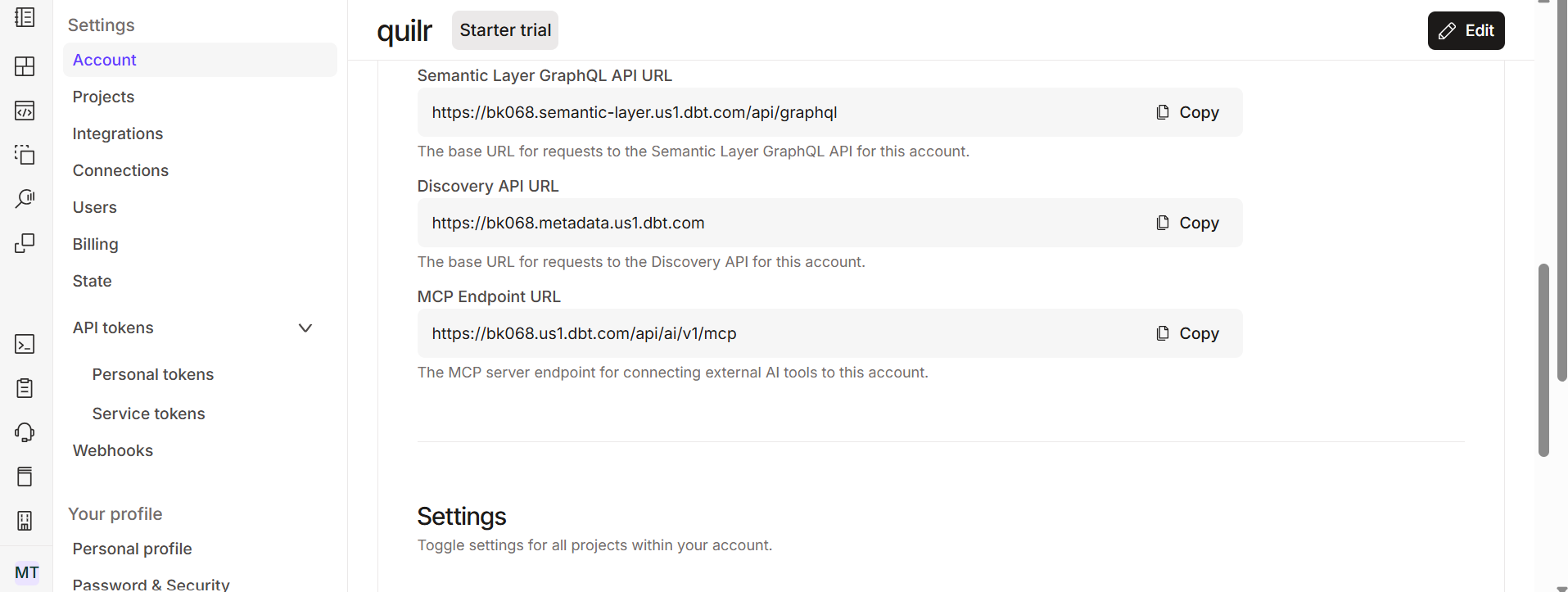
Example only - the account prefix (bk068) and region (us1) shown here are specific to one account. Yours will differ.
The URL follows the pattern https://<account-prefix>.<region>.dbt.com/api/ai/v1/mcp/, for example https://abc123.us1.dbt.com/api/ai/v1/mcp/. Single-tenant and legacy accounts may instead show https://cloud.getdbt.com/api/ai/v1/mcp/.
Copy the value from Access URLs rather than hand-constructing it. The account prefix and region are both account-specific, and a wrong region is the most common cause of a failed connection. See dbt's Access, Regions, & IP addresses for the region hosts.
dbt's documentation specifies the endpoint with a trailing slash (/api/ai/v1/mcp/), while the value shown in the settings UI may omit it. If the connection fails to initialize, add the trailing slash and retry.
3. Add dbt MCP to QuilrAI
- In QuilrAI, go to MCP Gateway and click Add MCP.
- Paste the MCP Endpoint URL you copied above.
- Leave auth mode on auto-detect. dbt's remote server advertises OAuth, so QuilrAI does not need a Client ID or Client Secret.
- Authorize when prompted. The dbt sign-in page opens in the browser.
- Sign in as the dbt user whose permissions the tools should run with, complete MFA, and approve the requested scopes.
- After authorization, QuilrAI connects and fetches the available tools.
The session persists after the first authorization, so later connections do not re-prompt until the session expires or is revoked.
4. Expect An MFA Prompt
dbt enforces multi-factor authentication on the account, so the browser sign-in can divert to a Keep Your Account Safe screen asking you to add another authentication method before it returns to QuilrAI. dbt offers three options:
Enroll the factor, finish the sign-in, and the flow returns to QuilrAI and completes. The authorization does not fail here, it just pauses until enrollment is done.
Enroll MFA on the authorizing dbt user before starting Add MCP. Hitting enrollment mid-flow is the most common reason this setup looks stuck.
Token-Based Alternative
If OAuth is unavailable for your account - no static subdomain, or a plan without the beta - dbt also accepts a token in request headers. This path needs a long-lived credential, so prefer OAuth when you can use it.
Two token types work, with different limits:
These headers take numeric IDs only, not URLs. Pasting a full environment URL such as https://abc123.us1.dbt.com/deploy/12345/projects/67890/environments/54321 instead of 54321 is a frequent misconfiguration. Copy just the trailing number.
Restrict The Tool Surface
dbt accepts two optional headers that trim what the server exposes, which is worth using to reduce context usage and limit blast radius:
Disabling the sql toolset is the simplest way to prevent agents from executing arbitrary SQL against your warehouse while keeping metadata and Semantic Layer tools available.
Available Tools
The remote server exposes these toolsets:
The Administrative API toolset is not read-only. trigger_job_run, retry_job_run, and cancel_job_run change orchestration state in your dbt account. Scope the authorizing identity's dbt permissions accordingly, or disable the toolset.
The dbt CLI and Codegen toolsets (run, build, test, compile, generate_model_yaml, and similar) are not available on the remote server. They require the self-hosted dbt MCP server, which is outside the scope of this guide.
Only text_to_sql consumes your dbt Copilot action allotment. The other tools do not. The remote server is rate limited to 5,000 requests per minute per IP, the same limit as dbt's other APIs.
Verify The Connection
Start with a read-only metadata request:
Using dbt, list the models in my dbt project and return just the names and descriptions.
Then check the Semantic Layer:
Using dbt, list the metrics defined in my Semantic Layer, then show the dimensions
available for one of them. Do not run any queries against the warehouse.
If the responses reflect your actual dbt project rather than generic answers, the connection is working. Leave warehouse-executing requests (execute_sql, query_metrics) until after the read-only checks pass.