Gateway Access
V2 console
This card lives in Policy Engine > LLM Gateway at web.quilr.ai/policy. Edits join the shared draft and take effect once you review and publish a revision.
Allow or deny an entire model request by who sent it, which app or model it targets, or what its prompt says. Denied requests are rejected before routing or scanning: no provider call, no tokens.
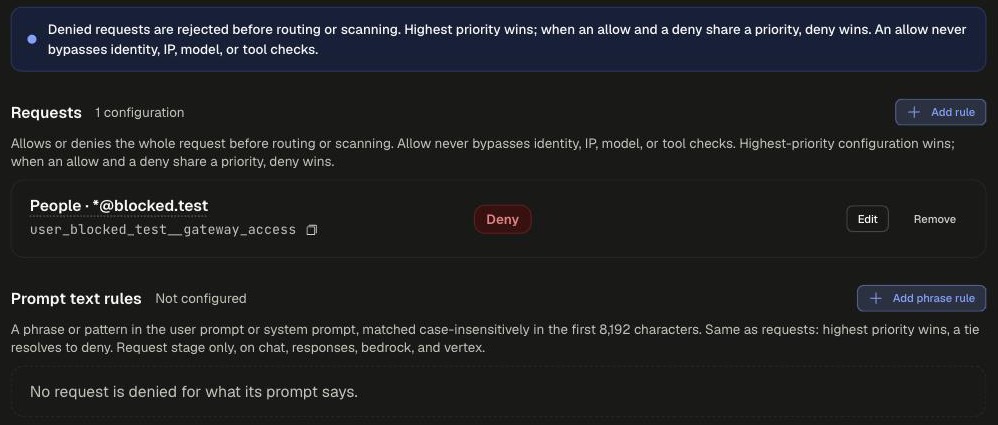
Sections
Request rule settings
An allow never bypasses identity, source IP, model or tool checks.
Phrase rule settings
Request stage only, on chat, responses, bedrock and vertex.
Examples
deny_frontier_models_to_internsrequest
runs on requestpriority 800
WhenSmart groupsincludes (ignoring case)Interns
andRequested modelis any ofclaude-opus-4gpt-4.1o3
Then
Request accessdeny
Risk levelmedium
finance_copilot_platform_team_onlyrequest
runs on requestpriority 850
WhenApplicationisFinance Copilot
andSmart groupsdoes not include (ignoring case)Finance Platform
Then
Request accessdeny
Risk levelhigh
For limiting models, an Allowed Models list is usually easier to maintain than a deny list.
Scoping and precedence
- Applies to: Everyone, People, Smart group, Application, App tag, Requested model, Provider, API surface, Environment, Prompt text, Tool, Source network, or Except... to carve people out of a broader rule.
- Highest priority wins. When an allow and a deny share a priority, deny wins. Phrase rules follow the same rule.
Legacy app setting
None. Gateway Access is a policy-only control with no equivalent app settings section.