Hallucination Protection
This card lives in Policy Engine > LLM Gateway at web.quilr.ai/policy. Edits join the shared draft and take effect once you review and publish a revision.
Score model responses for hallucinations and monitor or block them above a confidence threshold. Runs at the response stage.
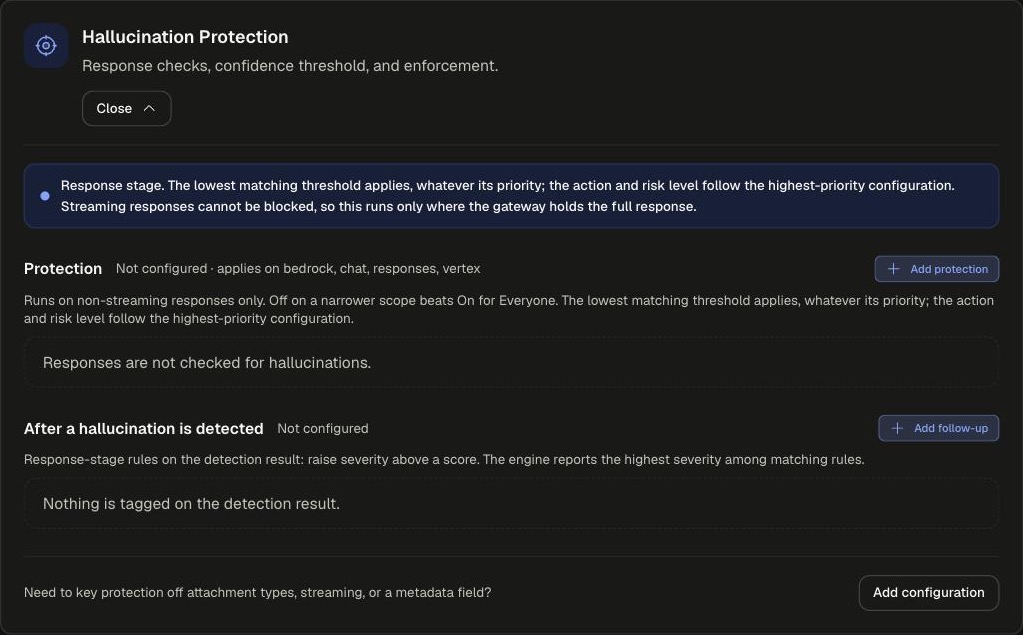
Sections
Applies on bedrock, chat, responses and vertex, and only to non-streaming responses. Streaming responses cannot be blocked, so they are not checked.
Settings
Add protection opens the Hallucination protection dialog.
Follow-up rules
Add follow-up opens Hallucination follow-up. When is one of: a hallucination is detected, the score is at least (0 to 1), or the risk level is (Low, Medium, High). The rule then tags a severity. The highest severity among matching rules is reported.
Example
runs on responsepriority 500
Start at monitor, then move the action or the threshold.
Scoping and precedence
- Applies to: Everyone, People, Smart group, Application, App tag, Requested model, Provider, API surface, Environment, Tool, Source network, or Except....
- Threshold: the lowest matching threshold applies, whatever its priority. A narrower scope cannot raise the threshold set for Everyone.
- Action and risk level follow the highest-priority matching configuration.
- Off on a narrower scope beats On for Everyone.
- Need to key protection off attachment types, streaming or a metadata field? Use Add configuration.
Legacy app setting
Replaces the Hallucination check in an app's Security Guardrails.